3281 E. Guasti Rd, STE 700, Ontario, CA 91761
1712 9th Ave SW, Watertown, SD 57201

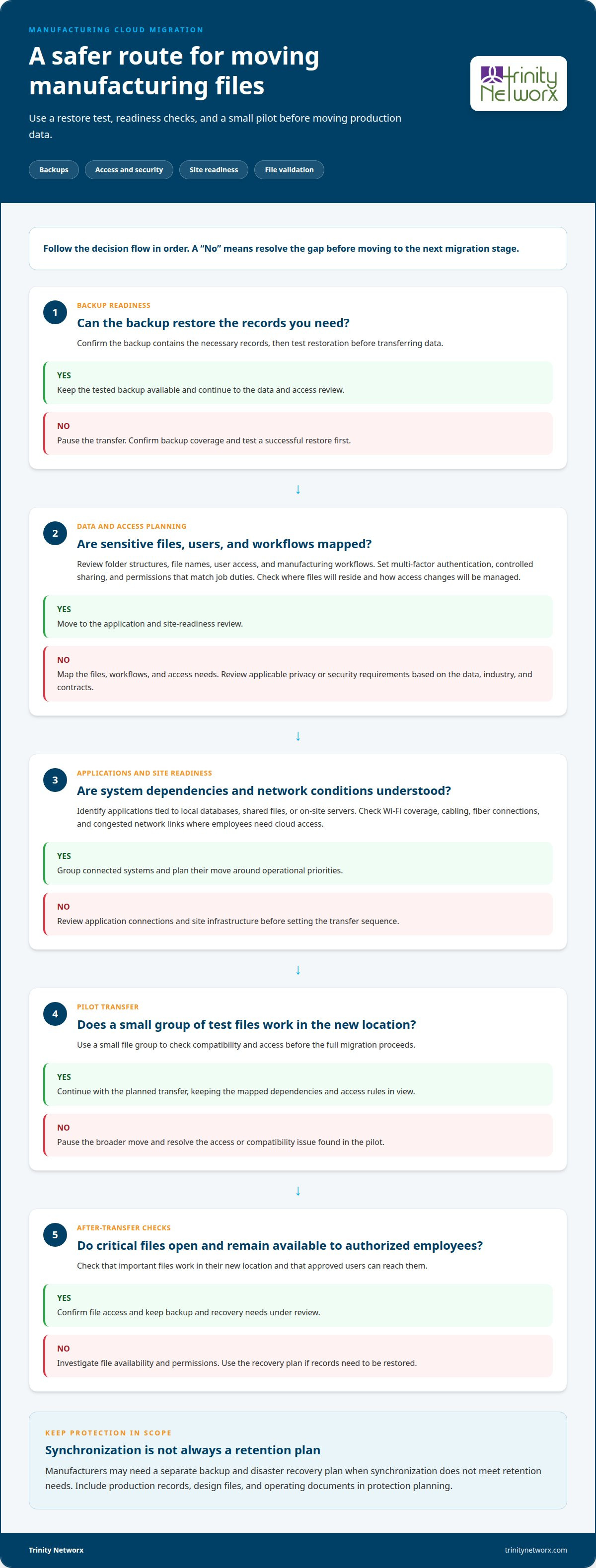
A cloud move is only safe when the files can be restored, tested, and checked after transfer. For businesses considering cloud migration services in Riverside CA, that means validating backups, moving a small file group first, and confirming critical information works in its new location before the full migration proceeds.
It’s reasonable to weigh data protection against the cost of maintaining on-site servers. Cloud expenses depend on factors such as subscriptions, storage, software connections, and future growth. Migration planning also depends on your data, internet connection, users, and existing systems. This guide covers how to reduce disruption, compare cloud and server costs, and plan a move for a Riverside-area business. It also explains how security settings, folder structures, and access permissions fit into a migration plan shaped around your operations.
• Learn how a migration plan can test files, confirm backups, and protect manufacturing data during transfer.
• Compare cloud subscriptions with server ownership by looking at storage, software connections, and expansion needs.
• See how applications, networks, and storage shape migration planning for Riverside and Inland Empire operations.
• Explore how managed IT, cybersecurity, and backup and recovery support a safer move to the cloud.
A safe transition starts with recoverable backups, a small test transfer, and checks that critical files work afterward. California privacy and security requirements depend on the data, industry, and contracts involved.
Before a transfer, map sensitive files, user access, and manufacturing workflows. Security settings should include multi-factor authentication, controlled sharing, and permissions aligned with job duties. Your data and contracts determine which privacy or compliance requirements apply. Review where files will reside, who can access them, and how access changes will be managed.
A migration assessment can inventory applications, storage, folder structures, file names, and permissions. Confirm that backups contain the necessary records and test restoration before transferring data. A pilot with a small group of files can uncover access or compatibility issues early. After migration, check that critical files open correctly and remain available to authorized employees.
Manufacturers also need ongoing cloud management and a separate backup and disaster recovery plan when synchronization alone does not meet retention needs. Managed backup and recovery can protect production records, design files, and operating documents. Riverside County’s population estimate for July 1, 2025 (V2025), is 2,544,916 people, according to Riverside County. Its 2020 land area is 7,209.27 square miles, according to Riverside County. Construction technical expertise helps align site networks and infrastructure with cloud environments. Explore cloud and AI services for technology planning.
For a manufacturer, compare the full cost of cloud subscriptions with the cost of owning on-site servers. Cloud billing reflects storage and software connections, while adding users or capacity can change subscription costs. Monthly planning may be more straightforward, but recurring charges still need to be reviewed against actual workloads, file growth, and production schedules.
An on-site server budget includes hardware, maintenance, power, cooling, and replacement planning. For example, a plant storing design files locally may need more storage and backup hardware as those files grow. A fair cloud comparison also accounts for storage, production software integration, data transfer, and ongoing technical administration, not just the subscription.
Cloud services can suit teams that need to share drawings across offices or job sites. Servers may better fit workloads tied to local equipment or applications that rely on nearby systems. In Riverside County, weigh how production staff access files and how much disruption a transition could cause. Include the effect on productivity in your comparison.
Construction technical expertise connects the cloud decision to the site’s physical infrastructure. Weak Wi-Fi coverage, aging cabling, or congested network links can slow file access, even after a move. Reviewing network cabling infrastructure alongside storage and software needs helps align connectivity with manufacturing workflows and supports a smoother transition.
When evaluating cloud services, consider subscription costs, available storage, integration with existing software, and the capacity to scale.
Manufacturers in Riverside and the Inland Empire need a migration plan that connects applications, network capacity, and storage requirements. A production scheduling platform, for example, may depend on local databases or shared files. Mapping these dependencies first helps teams sequence the move around operational priorities instead of treating every system alike. For manufacturers evaluating cloud migration services in Riverside CA, dependency mapping helps define the project scope.
Riverside manufacturers can work with providers that assess business applications, infrastructure, and data protection needs. A provider delivering cloud migration services in Riverside CA should explain how it will coordinate platforms, user access, and the transition plan. The right fit understands how production systems and office tools depend on each other.
In California facilities, weak wireless coverage, aging cabling, or congested network links can disrupt access to cloud applications. Construction technical expertise connects migration planning with the physical site: cabling routes, wireless coverage, equipment locations, and fiber connections. These details matter when staff need drawings, work orders, or inventory records across production areas. For organizations planning a broader technology review, IT services for manufacturing connect infrastructure decisions with shop-floor workflows.
Group systems by dependencies and business impact to plan the work. Schedule connected applications together, coordinate storage changes, and check network readiness before each stage. If a production application relies on an on-site file server, account for that connection before moving its data. This coordination helps Riverside County manufacturers limit disruption and keep access aligned with daily operations.
Trinity Networx, LLC helps manufacturers plan cloud migration as part of their broader operations. When production records, design files, or shared applications cross departments, the move needs to account for access, security, and continuity together. Technology decisions should connect with plant workflows and site infrastructure, not sit apart from them.
Managed IT Services and Cloud Solutions support planning for systems, users, and data moving into cloud environments. Cybersecurity & Anti-virus addresses access controls and account protection as teams adopt new file-sharing practices. For manufacturers balancing office systems with production needs, coordinated planning connects migration work to how employees do their jobs.
Data Backups & Disaster Recovery supports planning for business information and recovery. This matters for production records and design documents employees may need after a system disruption. Consider backup and disaster recovery alongside cloud storage, so file access and recovery needs are planned together.
Turn to Trinity Networx, LLC when a manufacturing team needs help planning a cloud move, strengthening cybersecurity, or organizing backup and recovery. Construction technical expertise connects technology planning with physical infrastructure, including the networks employees rely on across work areas. A clear scope can account for applications, file access, and operational priorities without treating migration as a stand-alone IT task. Contact Trinity Networx, LLC to discuss your organization’s needs.
Coordinate the project with business leads and employees who rely on each system. Include a communication plan, clear decision owners, and a way to report problems during the transition. For example, staff should know where to report an access issue and who can approve a change that affects production work.
Choose a provider that explains its responsibilities plainly and can plan around manufacturing schedules. For cloud migration services in Riverside CA, look for a written scope, a designated project lead, and clear support arrangements after launch. “Top” is subjective; the right fit depends on how well the provider’s process matches your operation.
Manufacturers can run into trouble by assuming every legacy application works in the cloud or moving workflows without reviewing how employees use them. For example, an older production tool may depend on a specific file format or local connection. Reviewing compatibility and orienting staff can reveal these practical issues before they disrupt routine work.
Project planning can cover application compatibility, user accounts, licensing coordination, and orientation for employees adjusting to changed workflows. These details matter when production teams use specialized software alongside everyday office applications. Define project responsibilities clearly so internal staff know which decisions and tasks remain with their organization.
Pricing depends on the project scope and is provided after a quote request. Review how the estimate separates one-time migration work from ongoing cloud subscriptions and support. Also look for stated assumptions about third-party software licensing, billing periods, and post-move assistance. Clear line items make it easier to compare the proposed arrangement with current IT spending.

Article by
Lance Reichenberger, Ph.D.., J.D. (Candidate)
Dr. Lance Reichenberger is the founder of Trinity Networx, a Southern California technology firm specializing in managed IT services, cybersecurity, network infrastructure, and business technology strategy. With nearly four decades of experience in the IT industry, he works with businesses to improve operational efficiency, strengthen security, and align technology with long-term growth objectives.
Lance focuses on proactive IT management, enterprise wireless infrastructure, cybersecurity integration, and scalable technology solutions for growing organizations throughout Southern California.
The content published on this website is provided for general informational and educational purposes only. Articles may be created, edited, or enhanced with the assistance of artificial intelligence and automation tools under the direction and review of Trinity Networx. While every effort is made to ensure accuracy and relevance, the information provided should not be considered professional, legal, financial, cybersecurity, or technical advice specific to your organization. Businesses should consult directly with a qualified professional regarding their unique environment, compliance requirements, and operational needs. Trinity Networx makes no warranties regarding completeness, reliability, or applicability of the information contained within these articles.
Schedule a brief conversation with Trinity Networx to discuss your business technology needs.
Get a practical roadmap built around your business, your users, your systems, and the technology issues that need attention first.
Put the right technology, support, security, and infrastructure in place so your business can grow, adapt, and move forward with confidence.