3281 E. Guasti Rd, STE 700, Ontario, CA 91761
1712 9th Ave SW, Watertown, SD 57201

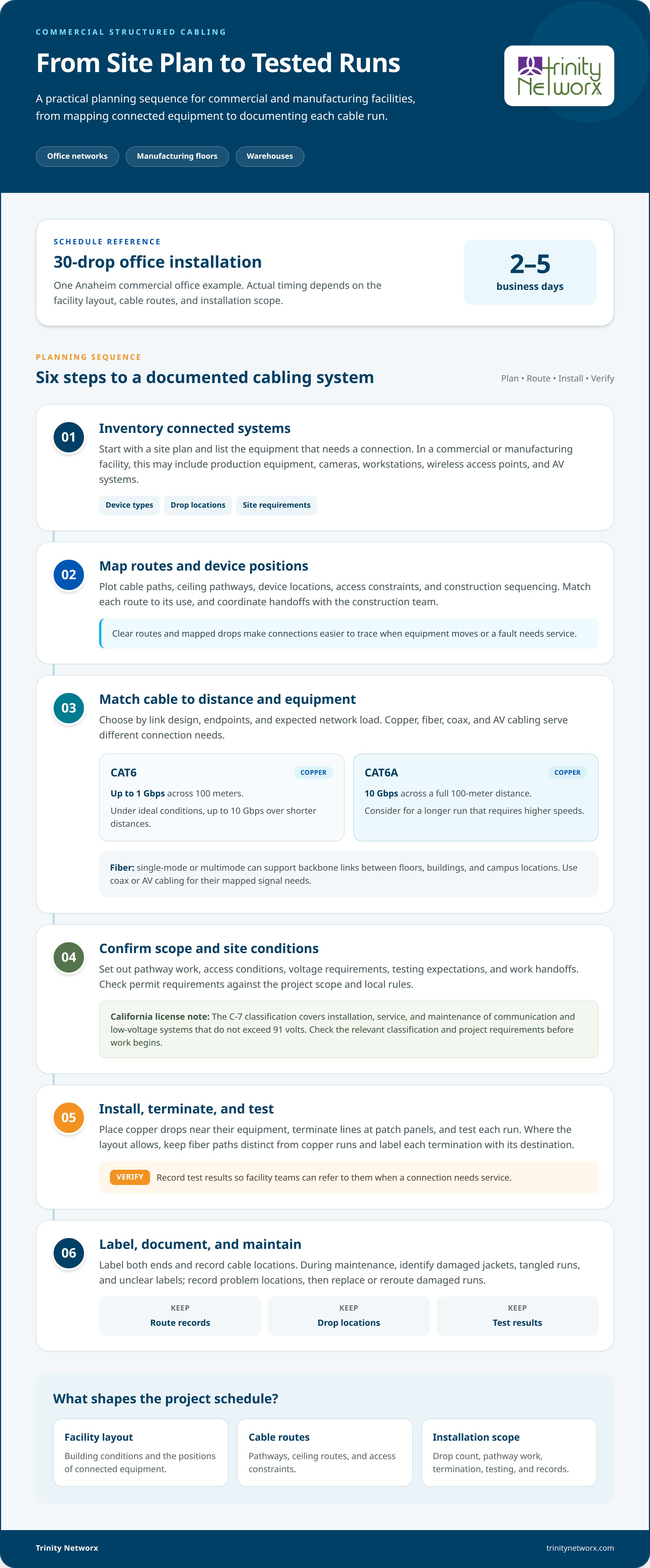
A 30-drop commercial office cabling installation in Anaheim can take 2 to 5 business days. For commercial structured cabling in Southern California, the schedule also depends on the facility layout, cable routes, and the work needed to support the network.
That timeline matters, but so does the cabling system behind it. Cabling decisions affect equipment connectivity, the reliability of network infrastructure, and the scope of low-voltage work.
This article explains the factors that shape commercial cabling project scope, including cable choices and site conditions, and how structured cabling supports manufacturing and other commercial facilities. You’ll also learn what to include in project planning and when professional installation can help address infrastructure problems before they disrupt operations.
• Learn which installation and maintenance practices help protect commercial cabling from wear and support dependable network connections.
• See how CAT6 and CAT6A capabilities can inform cable choices for office and industrial environments.
• Understand what affects low-voltage project schedules, from building layout to cable routes and installation scope.
• Explore how professional cabling and fiber installation can help resolve infrastructure issues that disrupt business operations.
Protect cabling by matching each cable type to its route, environment, and connected equipment. In a warehouse, clear labels and protected ceiling pathways make connections easier to trace and maintain.
Cat6 and Cat6A copper cabling connect equipment across work areas, while coax and AV cabling serve other signal needs. Fiber suits links where copper is not the right fit. Plan each route around its use: access points need network connectivity, while AV equipment needs its own mapped connections. Keep cable paths organized, label both ends, and record locations so later changes don’t turn into guesswork. A documented commercial network cabling plan helps teams trace connections through a warehouse or office ceiling.
Single-mode and multimode fiber can support backbone links between floors, separate buildings, and campus locations. Choose based on the link design and endpoints, and map the route before installation. For example, a fiber backbone can connect floor-level network rooms, while a campus link connects buildings. Where the layout allows, keep fiber paths distinct from copper runs, and label each termination with its destination. These records help technicians trace connections when equipment moves or changes.
Damaged cable jackets, tangled ceiling runs, and unclear labels make faults harder to trace. A loose or poorly routed connection can interrupt access points, warehouse systems, or office equipment. Older cabling may also limit which devices a network can support, leading to workarounds as equipment changes. During maintenance, identify damaged sections, record their locations, and replace or reroute problem runs. Keep copper, fiber, coax, and AV connections clearly identified in the labeling records.
Permit requirements depend on the project scope and local rules; adding pathways or changing ceiling routes may affect the work. According to California Contractors State License Board, California’s C-7 classification covers contractors who install, service, and maintain communication and low-voltage systems that do not exceed 91 volts. Check the relevant license classification and project requirements before work begins.
It can, when the installation suits the facility’s network requirements and uses appropriate cable types. On a manufacturing floor, cameras, workstations, and wireless access points may each need different drop locations and cable routes.
CAT6 supports data speeds up to 1 Gbps across 100 meters. Under ideal conditions, CAT6 can support up to 10 Gbps over shorter distances. CAT6A carries 10 Gbps across a full 100-meter distance. The choice depends on the distance, equipment, and expected network load. A shorter route may suit CAT6, while a longer run requiring higher speeds points toward CAT6A.
Installation quality matters as much as cable category. Technicians map pathways, place copper drops near cameras and workstations, terminate lines at patch panels, and test each run. Documentation of drop locations and test results gives facility teams a practical reference when equipment moves or a connection needs service.
Compare bids by matching their scope line by line. Check the proposed cable category, drop count, pathway work, patch-panel termination, testing, and documentation. For example, a proposal that includes CAT6A drops for production equipment differs from one using CAT6 throughout. Ask each contractor to state which work is included and how completed runs will be recorded.
Project cost depends on cable type, route access, drop locations, and installation scope; pricing follows a quote request. For a facility plan, discuss your cabling project and the infrastructure requirements shaping the work.
Low-voltage work connects building systems to network infrastructure. A clear scope, coordinated pathways, and site-specific planning keep construction decisions aligned with operational needs.
A commercial contractor coordinates cable routes, device locations, and handoffs with construction teams. For a manufacturing facility, that can mean planning network connections for production equipment, cameras, and office workstations. The project scope should identify voltage requirements, pathway conditions, access constraints, and testing expectations. A 30-drop commercial office cabling installation in Anaheim takes 2 to 5 business days. Larger or more complex facilities need schedules shaped around their building layout and work scope.
Regional commercial projects can span Los Angeles, Orange County, San Diego, Riverside, and San Bernardino. Inland Empire facilities may involve warehouses, distribution centers, or manufacturing sites with distinct network infrastructure needs. A contractor’s service coverage matters when one enterprise operates across several locations. Planning should define each site, identify the work required, and coordinate delivery across the project schedule.
Start with a site plan and an inventory of connected systems. Then map cable routes, device positions, construction sequencing, and testing responsibilities. For example, a warehouse expansion may need new access points while existing production systems stay in operation. Coordinated low-voltage planning aligns construction with the facility’s connectivity needs, instead of leaving cabling until the last minute.
For commercial cabling support tied to a facility project, discuss your low-voltage project.
Trinity Networx installs commercial structured cabling and fiber optic systems for facilities that need dependable connections across offices, production areas, and equipment rooms. Consider this service when outdated routes, inconsistent labeling, or new machinery create gaps in network infrastructure. Planned copper and fiber runs can connect workstations, network rooms, and production equipment, with clear routes for testing and maintenance.
For manufacturing sites, cabling plans should account for the building layout, device locations, and how construction work affects daily operations. Trinity Networx also supports broader technology needs with Managed IT Services, Cybersecurity Solutions, and Data Backup & Recovery. Each service addresses a distinct need, from day-to-day IT management to protecting business data.
To discuss your facility’s cabling needs, contact Trinity Networx.
Make cabling part of your facility’s operating strategy, rather than waiting for network problems to slow production. Start by mapping upcoming equipment changes, areas with unreliable connections, and construction work that could affect network routes.
For commercial structured cabling in Southern California, connect the installation plan to the systems your business depends on. Trinity Networx also provides Managed IT Services, Cybersecurity Solutions, and Data Backup & Recovery for broader technology needs.
Contact Trinity Networx about your project to discuss your facility’s cabling requirements. A deliberate plan gives your team a stronger starting point for its next technology decision.
A commercial network installation schedule depends on site access, the number of endpoints, pathway readiness, and coordination with other trades. An active office may need work phased by room, while a new build can align cabling with construction milestones. Include equipment delivery, testing, and network activation in the schedule so each handoff is clear.
CAT6A offers more performance headroom for demanding endpoints, while CAT6 may suit locations whose devices and planned workloads need less capacity. Compare switch ports, device requirements, route conditions, and expected equipment changes. For example, a facility might specify CAT6A for production equipment while assigning CAT6 to office connections, based on each area’s requirements.
Warehouse traffic, ceiling access, and changes to HVAC or production equipment can disturb cable routes in Inland Empire facilities. Tie inspections to planned maintenance or renovation work. Look for displaced supports, compressed cables, and loose cabinet connections, then record repairs against the affected area. This gives facility teams a useful history when troubleshooting recurring interruptions.
Include cabling in project planning once the floor plan and equipment locations begin to take shape, before finish work blocks access to pathways. Coordinate circuit provisioning, construction access, furniture layouts, security devices, and occupancy dates in one schedule. For a relocation, plan network cutover and temporary connectivity alongside the move instead of improvising connections on arrival day.
Commercial structured cabling contractors can plan and install copper or fiber connections, coordinate routes with construction trades, and connect business equipment across a facility. A project may also define how separate buildings or production areas connect to the network. Set the scope around the sites, systems, and construction sequence involved so responsibilities and handoffs are clear before work begins.

Article by
Lance Reichenberger, Ph.D.., J.D. (Candidate)
Dr. Lance Reichenberger is the founder of Trinity Networx, a Southern California technology firm specializing in managed IT services, cybersecurity, network infrastructure, and business technology strategy. With nearly four decades of experience in the IT industry, he works with businesses to improve operational efficiency, strengthen security, and align technology with long-term growth objectives.
Lance focuses on proactive IT management, enterprise wireless infrastructure, cybersecurity integration, and scalable technology solutions for growing organizations throughout Southern California.
The content published on this website is provided for general informational and educational purposes only. Articles may be created, edited, or enhanced with the assistance of artificial intelligence and automation tools under the direction and review of Trinity Networx. While every effort is made to ensure accuracy and relevance, the information provided should not be considered professional, legal, financial, cybersecurity, or technical advice specific to your organization. Businesses should consult directly with a qualified professional regarding their unique environment, compliance requirements, and operational needs. Trinity Networx makes no warranties regarding completeness, reliability, or applicability of the information contained within these articles.
Schedule a brief conversation with Trinity Networx to discuss your business technology needs.
Get a practical roadmap built around your business, your users, your systems, and the technology issues that need attention first.
Put the right technology, support, security, and infrastructure in place so your business can grow, adapt, and move forward with confidence.