3281 E. Guasti Rd, STE 700, Ontario, CA 91761
1712 9th Ave SW, Watertown, SD 57201

A green backup status can hide a failed restore or a file already changed by malware. Validating our data backup integrity means checking the backup and proving the recovery process works. Set a monthly validation schedule that includes full restore simulations, automated checksum checks, and malware scans.
You’re right to look beyond whether a backup job completed. A usable recovery copy must be accurate, intact, and free of threats that could return with restored data. This guide explains how schedules and realistic recovery tests expose gaps, how checksums detect changes, and how malware scans add another layer of scrutiny. You’ll get practical checks for recovery readiness, not just a reassuring green status.
• Set backup validation intervals shorter than the retention window, so clean recovery points remain available for testing.
• Test the full restore sequence, including scripts and database recovery, against the business’s downtime needs.
• Use checksums or hashes to spot data changes that a successful backup status may not reveal.
• Include malware and integrity scans in backup health checks, especially for copies kept long term.
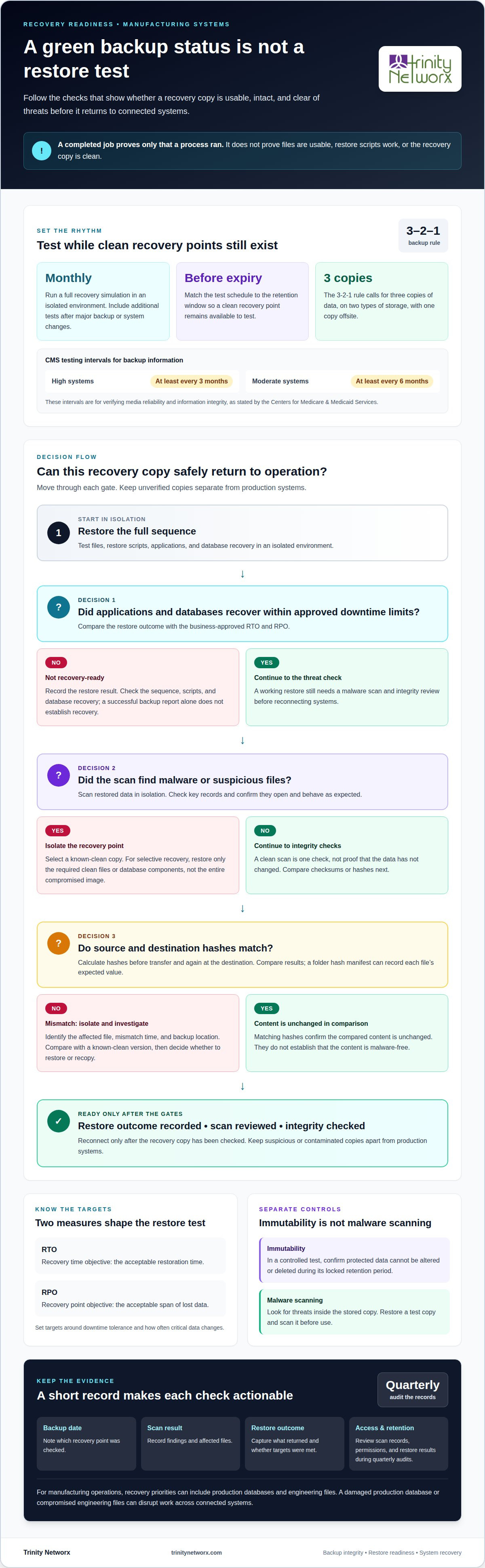
A completed backup job proves only that a process ran. It doesn’t prove the files are usable, the restore scripts work, or the recovery copy is clean. Schedule monthly recovery simulations that run the full restore sequence in an isolated environment. Record whether applications and databases return within your business’s downtime limits.
The 3-2-1 backup rule calls for three copies of data, stored on two types of storage, with one copy offsite. A schedule should also match the backup retention window: test copies before they expire, so a clean recovery point remains available. The Centers for Medicare & Medicaid Services says High systems must have backup information tested at least every three months, and Moderate systems at least every six months, to verify media reliability and information integrity.
How often should organizations test backups? Monthly recovery simulations are a practical cadence, with additional tests after major backup or system changes. Software verification alone can miss damaged files, broken restore scripts, or malware stored in a backup. A success message is not a completed recovery test.
Clean and contaminated recovery points need different handling. During a simulation, identify a known-clean copy, restore it separately, and scan it before reconnecting systems. To recover selectively from an infected backup, restore only the required clean files or database components, not the entire compromised image.
Recovery time objective (RTO) is the acceptable restoration time; recovery point objective (RPO) is the acceptable span of lost data. Tests should meet your business’s approved RTO and RPO, based on downtime tolerance and how often critical data changes.
A checksum is a calculated value assigned to a file or data block for later comparison. If the content changes, its checksum will usually change too. The National Institute of Standards and Technology (NIST) describes integrity validation as detecting even minute data changes. Automated comparisons can therefore reveal corruption that a completed backup report may not show.
Use a consistent sequence: calculate hashes for the source data, transfer the backup, then calculate hashes again at its destination. Compare the results and investigate any mismatch. For a completed folder, a hash manifest can record each file’s expected value. Protect and store that manifest separately from the backup, so an attacker cannot quietly alter both copies and replace the comparison baseline.
Filesystems such as ReFS and ZFS can use checksums to check data at the volume or block level. ZFS stores block checksums separately from the files. A mirror scrub compares stored blocks with those values and can retrieve a valid block from another mirror location if it finds a mismatch. These checks can reveal storage errors, but they don’t establish that the original data was clean before backup.
Set automated checks to report the affected file, mismatch time, and backup location. Then isolate the copy, compare it with a known-clean version, and decide whether to restore or recopy it. A matching hash confirms that compared content is unchanged, not that it is free of malware. For help shaping these checks into a recovery process, discuss backup integrity checks with the team.
A backup can preserve corrupted data just as faithfully as clean data. Validate each recovery copy by restoring it in an isolated environment, scanning files for malware, and checking that key records open and behave as expected. Keep suspicious copies separate from production systems until the scan and review are complete.
How do you validate data backup integrity? Run scheduled health checks, scan backup contents, and test a restore using representative files or systems. Record the backup date, scan result, restore outcome, and any affected files. A disk utility such as fsck can check a drive, but it doesn’t necessarily inspect the backed-up data itself.
For ransomware protection, test whether backup access controls and retention settings resist unauthorized changes. For an immutable backup, confirm in a controlled test that protected data cannot be altered or deleted during its locked retention period. Then restore a test copy and scan it before use. These checks assess separate controls: immutability limits changes to stored copies, while malware scanning looks for threats within them.
Schedule integrity checks at least monthly, and conduct quarterly audits of scan records, access permissions, and restore results. Enable health checks in backup job settings, especially for long-term retention copies. If a scan finds malware, isolate the affected recovery point and select a clean copy before restoring business data.
Need a repeatable process for backup scans and recovery checks? Talk with our team about backup integrity.
Trinity Networx provides Data Backup & Recovery for organizations that need dependable copies and a tested path back to operation. Turn to this service when backup jobs complete but recovery tests remain unproven, checksum alerts go unresolved, or malware scans flag stored files. In manufacturing, a damaged production database or compromised engineering files can disrupt work across connected systems.
Backup and recovery support can bring schedules, restore testing, and integrity checks into one operating plan. Managed IT Services can also help coordinate backup monitoring with broader system maintenance. The practical goal is to know which recovery point is clean, how restoration proceeds, and where the process needs attention before an incident puts it under pressure.
Invite Trinity Networx to discuss your backup and recovery needs. Contact Trinity Networx.
Make validating our data backup integrity part of operational planning, not an isolated IT task. In manufacturing, recovery priorities should reflect which systems keep production moving, who owns restoration decisions, and how teams coordinate when data access is disrupted. Clear ownership turns technical checks into an operational capability.
Trinity Networx, LLC offers Data Backup & Recovery, Managed IT Services, and Cybersecurity Solutions to support that work. The next step is to align your recovery process with business priorities and identify where technical support can close gaps. Contact Trinity Networx, LLC to discuss backup support. A clear plan puts your team in a stronger position to restore operations with confidence.
Data integrity means records remain complete and dependable throughout their lifecycle. Set rules for required fields, preserve each record’s source and edit history, and assign an owner for data quality. In manufacturing, a batch record without its lot identifier can undermine traceability. Flag incomplete records at entry, before they flow into production reports or downstream systems.
Check that each checksum record identifies the correct dataset version and capture time. A mismatch matters only if the baseline is trustworthy and describes the same files. Restrict access to checksum records, and review backup logs for failed reads, skipped files, or unexplained size changes. These clues help distinguish storage damage from ordinary changes to live data after capture.
Write a test case that specifies the system scope, recovery point, expected result, and responsible business owner. After recovery, validate a real workflow, such as retrieving a completed production order and generating its associated report. Confirm that linked services and user roles work as expected. Record exceptions, assign follow-up owners, and retain the test record for the next review.
Backup verification checks whether the backup process and stored copy pass technical checks. Restore testing examines whether the recovered system supports the business task that depends on it. For example, a production team may need both a work order and its related history. A successful technical status alone doesn’t show whether the workflow is usable.
Backup platforms can schedule job validation, produce failure alerts, and retain activity logs. Database-native consistency tools can assess database structures, while monitoring systems can collect errors across backup jobs and storage. Choose tools that preserve timestamps, affected asset names, and clear results. These details help IT staff direct a failed check to the right system owner without sorting through vague alerts.

Article by
Lance Reichenberger, Ph.D.., J.D. (Candidate)
Dr. Lance Reichenberger is the founder of Trinity Networx, a Southern California technology firm specializing in managed IT services, cybersecurity, network infrastructure, and business technology strategy. With nearly four decades of experience in the IT industry, he works with businesses to improve operational efficiency, strengthen security, and align technology with long-term growth objectives.
Lance focuses on proactive IT management, enterprise wireless infrastructure, cybersecurity integration, and scalable technology solutions for growing organizations throughout Southern California.
The content published on this website is provided for general informational and educational purposes only. Articles may be created, edited, or enhanced with the assistance of artificial intelligence and automation tools under the direction and review of Trinity Networx. While every effort is made to ensure accuracy and relevance, the information provided should not be considered professional, legal, financial, cybersecurity, or technical advice specific to your organization. Businesses should consult directly with a qualified professional regarding their unique environment, compliance requirements, and operational needs. Trinity Networx makes no warranties regarding completeness, reliability, or applicability of the information contained within these articles.
Schedule a brief conversation with Trinity Networx to discuss your business technology needs.
Get a practical roadmap built around your business, your users, your systems, and the technology issues that need attention first.
Put the right technology, support, security, and infrastructure in place so your business can grow, adapt, and move forward with confidence.