3281 E. Guasti Rd, STE 700, Ontario, CA 91761
1712 9th Ave SW, Watertown, SD 57201

Onsite support can bring a technician to your workplace when a technology issue needs hands-on attention. IT support for businesses in Rancho Cucamonga can also include managed IT and ransomware protection, helping local companies maintain dependable systems and prepare to respond to threats.
When devices, networks, or business systems interrupt the workday, a quick fix may not address the cause. This article explains how managed IT differs from reactive troubleshooting, when onsite support helps, and how ransomware protection and recovery planning fit in. It also outlines how Trinity Networx supports business technology through managed IT, cybersecurity, and data backup and recovery.
• Learn how ongoing monitoring and tailored IT planning can help businesses move beyond one-off troubleshooting.
• See how cybersecurity measures and backup planning fit into a practical response to ransomware threats.
• Identify the technology issues that may call for hands-on support at a Rancho Cucamonga workplace.
• Explore when business phone services, managed IT, cybersecurity, or data recovery may better support your organization’s needs.
Managed IT replaces isolated fixes with ongoing oversight, documented responsibilities, and routine monitoring. The service scope should fit your workplace’s systems and operating needs.
Managed support means monitoring devices, networks, and user accounts instead of waiting for staff to report problems. Alerts can flag issues such as a full storage drive or an offline workstation before employees lose access. When comparing service plans, ask which systems are monitored, how alerts are handled, and whether support includes remote troubleshooting or onsite work. Small businesses can choose fully managed support or Co-Managed IT Services, where internal staff share defined responsibilities.
An assessment maps equipment, applications, access, and business priorities before a plan is set. A manufacturer, for example, may need distinct support for production workstations, office computers, and warehouse connectivity. A tailored plan should define covered users and devices, support boundaries, and priority systems. During onboarding and migration, expect an inventory, access review, a planned move sequence, and staff testing before routine use. Compare providers by how clearly they document each step and responsibility.
Small businesses can compare fully managed support, where an outside team handles agreed IT functions, with co-managed support, where internal staff share that work. Month-to-month service describes the agreement term; per-user pricing calculates charges by covered accounts. These are separate details to assess. Compare what the scope includes, how added users affect charges, and what happens when needs change. A clear proposal should connect covered people, devices, and support tasks to the stated billing method.
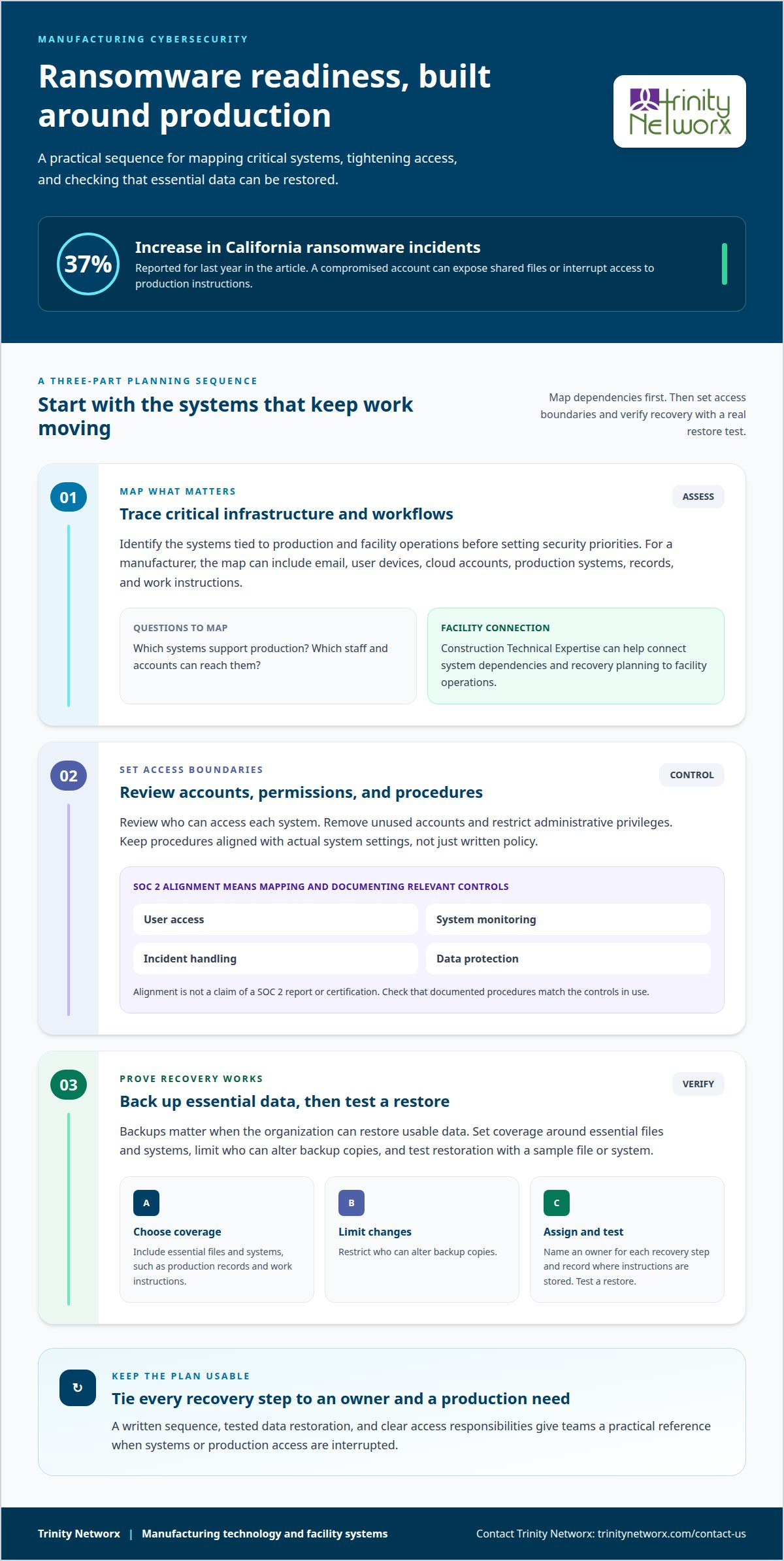
California ransomware incidents increased by 37% last year. A compromised account can expose shared files, disrupt scheduling, or interrupt access to production instructions. For a Rancho Cucamonga manufacturer, cybersecurity planning should map critical infrastructure, including email, user devices, cloud accounts, and systems tied to production. Review who can access each system, then remove unused accounts and restrict administrative privileges. Trinity Networx’s Construction Technical Expertise can help assess how these systems connect to facility operations and where access controls may leave production exposed.
SOC 2 alignment means mapping security practices to the relevant controls and documenting how they work. Review user access, system monitoring, incident handling, and data protection procedures. A manufacturer, for example, should know which staff can access production records and how access changes are recorded. Alignment is not the same as claiming a SOC 2 report or certification. A focused cybersecurity review can identify gaps between written procedures and actual system settings, then prioritize changes around production operations. Trinity Networx can bring its Construction Technical Expertise to bear on the facility systems and workflows those controls must support.
Backups matter only if the organization can restore usable data. Set backup coverage around essential files and systems, limit who can alter backup copies, and test restoration using a sample file or system. A manufacturer might prioritize production records and work instructions. Record who owns each recovery step and where recovery instructions are stored. Construction Technical Expertise can help connect recovery planning to the systems and processes that keep a production site operating. If ransomware concerns expose gaps in security or recovery planning, contact Trinity Networx to discuss your needs.
Support needs vary across Rancho Cucamonga, from office access to manufacturing systems. A production-floor connection problem can disrupt work before office users notice.
Business IT support can cover help desk support, network access, cybersecurity, cloud services, and onsite troubleshooting. For example, a manufacturer’s handheld inventory devices may lose connection in a new production area. Commercial Wi-Fi installation and wireless networking can address coverage needs. During a facility buildout, Trinity Networx’s Construction Technical Expertise can coordinate network cabling, equipment locations, and wireless coverage with construction plans, then test connections before production begins. In active production areas, technicians can assess dead zones, interference, and device access, then adjust access point placement and network settings to support shift operations. Match the service scope to the systems employees rely on throughout each shift.
Compare providers by reviewing relevant credentials, written service scope, escalation steps, and references from organizations with similar systems. Verify credentials with the issuing bodies and ask references about their documented experience. Outsourcing risks include unclear ownership, delayed escalation, or access remaining active after staff changes. Record responsibilities for account access, incident reporting, and system changes in the service agreement.
Managed IT providers serving Rancho Cucamonga may be local firms or regional partners. Choose based on onsite needs, response arrangements, and familiarity with your systems. A manufacturer should assess whether a provider can support both office networks and production-area connectivity. No single provider suits every operating model; compare service boundaries with your organization’s vision and primary business priorities. To discuss your support needs, contact Trinity Networx.
Trinity Networx can help when technology issues interrupt calls, access, or daily operations. Its Business VoIP, Managed IT Services, Cybersecurity Solutions, and Data Backup & Recovery address different needs. The right starting point depends on what is disrupting your work.
Business VoIP may suit an organization reviewing how its phone service supports staff and customer communication. For example, a manufacturer coordinating office teams with production operations may need reliable communication across those functions. Discuss call-handling needs, current phone workflows, and how employees work across locations before planning a change.
Managed IT Services can help when recurring technology issues consume staff time or routine system oversight lacks clear ownership. Ongoing support can align with business priorities, from user access to workplace systems. If your internal IT staff already handle some responsibilities, Co-Managed IT Services can support a shared approach rather than replace the team.
Cybersecurity Solutions may suit businesses reviewing account access, device security, and response procedures. Data Backup & Recovery addresses a different concern: restoring business information after data loss or system disruption. For construction or manufacturing operations, recovery planning should account for the files and systems employees need to resume work, not just the equipment.
Start with the issue, its effect on staff, and the systems involved. Trinity Networx can help connect that business need to the relevant service. Contact Trinity Networx to discuss your technology needs.
Connect technology decisions to the work your business needs to keep moving. Identify the systems staff rely on, disruptions costing them time, and support gaps affecting key tasks. Trinity Networx’s Construction Technical Expertise can help assess how technology and infrastructure issues affect daily operations and larger projects, then guide practical next steps for IT support for businesses in Rancho Cucamonga.
Trinity Networx provides Managed IT Services, Cybersecurity Solutions, and Data Backup & Recovery. Its Construction Technical Expertise can help align these services with infrastructure needs, security planning, and recovery readiness. A focused conversation about your priorities can clarify what to address first and how support should fit your organization’s operations.
Contact Trinity Networx about your IT support needs and take a practical next step toward steadier business operations.
Yes. Trinity Networx provides onsite and remote business technology support, including internet, phone, and printer issues. If a phone system problem needs hands-on attention, onsite support can address the workplace setup directly. Remote support can help resolve issues through secure access when an in-person visit is unnecessary.
IT support for businesses in Rancho Cucamonga can include managed IT, cybersecurity, data recovery, cloud computing, and business phone services. The right mix depends on where work is getting stuck. A manufacturer may prioritize production connectivity, while a professional office may focus on access to business applications. Start by identifying the systems causing the most disruption.
Pricing depends on the case and is provided after a quote request. The estimate depends on factors such as the number of users or devices, the support scope, and whether the need involves ongoing management, cybersecurity, cloud hosting, or a defined consulting project. This helps connect the proposed service to the actual systems and support responsibilities involved.
IT providers may offer remote troubleshooting and onsite assistance, but coverage and response arrangements differ by service agreement. Trinity Networx provides both onsite and remote business support, with a response time under 20 minutes for technical issues. Ask how a provider handles issues that require physical access, such as a workplace phone or internet problem, versus a remotely resolvable account issue.
Trinity Networx provides Cybersecurity Solutions and Data Backup & Recovery for business systems. Security services include endpoint protection, firewall management, threat detection, staff awareness training, and vulnerability assessments. Backup planning can include off-site storage and backup verification. If your business relies on customer records or production files, clarify which data is covered and how restoration responsibilities are handled.

Article by
Lance Reichenberger, Ph.D.., J.D. (Candidate)
Dr. Lance Reichenberger is the founder of Trinity Networx, a Southern California technology firm specializing in managed IT services, cybersecurity, network infrastructure, and business technology strategy. With nearly four decades of experience in the IT industry, he works with businesses to improve operational efficiency, strengthen security, and align technology with long-term growth objectives.
Lance focuses on proactive IT management, enterprise wireless infrastructure, cybersecurity integration, and scalable technology solutions for growing organizations throughout Southern California.
The content published on this website is provided for general informational and educational purposes only. Articles may be created, edited, or enhanced with the assistance of artificial intelligence and automation tools under the direction and review of Trinity Networx. While every effort is made to ensure accuracy and relevance, the information provided should not be considered professional, legal, financial, cybersecurity, or technical advice specific to your organization. Businesses should consult directly with a qualified professional regarding their unique environment, compliance requirements, and operational needs. Trinity Networx makes no warranties regarding completeness, reliability, or applicability of the information contained within these articles.
Schedule a brief conversation with Trinity Networx to discuss your business technology needs.
Get a practical roadmap built around your business, your users, your systems, and the technology issues that need attention first.
Put the right technology, support, security, and infrastructure in place so your business can grow, adapt, and move forward with confidence.