

3281 E. Guasti Rd, STE 700, Ontario, CA 91761
1712 9th Ave SW, Watertown, SD 57201

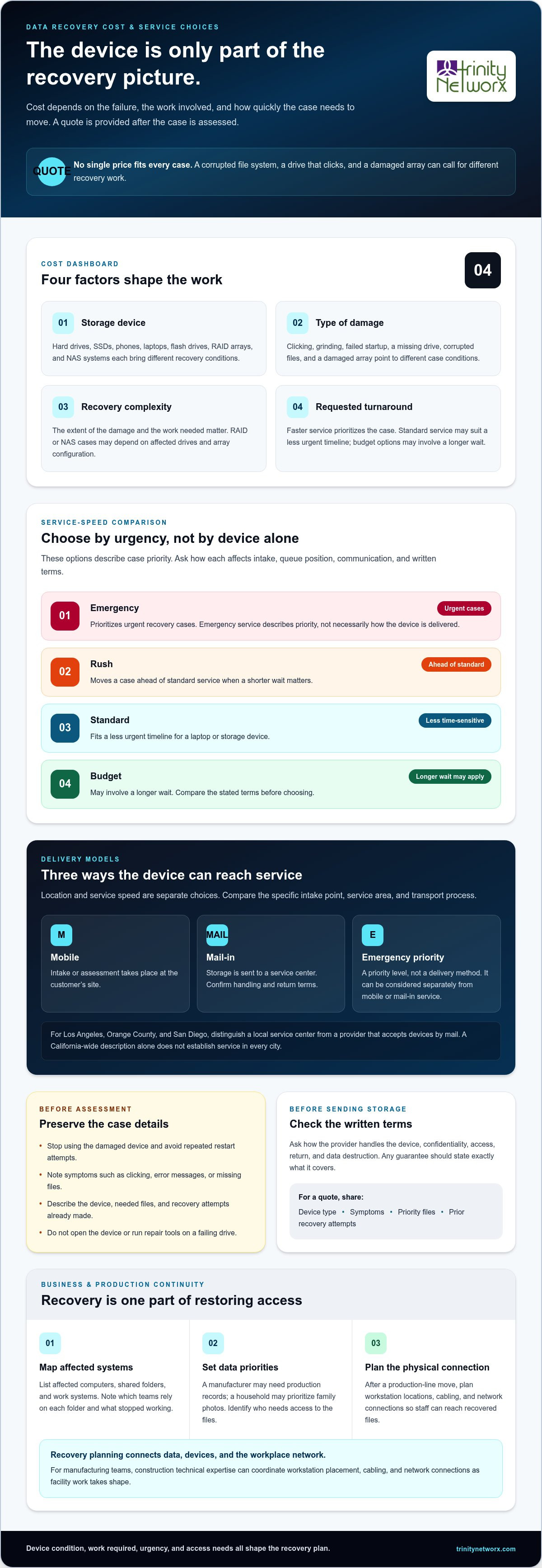
The recovery bill depends on the failure, not the value of the lost files. The price varies by case and is provided after a quote request. Key factors include the storage device, the type and extent of damage, the work required, and the requested turnaround. Southern California data recovery specialists assess these details because a failed drive, a corrupted file system, and physical damage can require different approaches. Faster service prioritizes the work, while standard service suits a less urgent timeline.
Losing access to business records, public files, school data, or personal photos creates different pressures, but each situation needs a clear plan. This guide explains what affects recovery costs, how service speeds compare, and what organizations and individuals should consider. It also explains how data recovery fits into backup and recovery planning, so you can choose a practical next step without assuming urgency has a one-size-fits-all solution.
• Compare recovery needs across hard drives, SSDs, phones, laptops, flash drives, RAID systems, and NAS devices to see what can shape the work involved.
• Match emergency, rush, standard, or budget service to the urgency of your data loss and the operational impact of waiting.
• Plan recovery around the data priorities of your business, government agency, school, or household.
• Connect recovery with ongoing IT support and backup planning to strengthen continuity after a data loss event.
The price varies by case and is provided after a quote request. The main cost factors are device type, damage, recovery complexity, and urgency. A hard drive with file-system corruption is different from one that clicks or will not spin. SSDs, phones, laptops, flash drives, RAID arrays, and NAS systems all present different recovery conditions, so the device alone does not determine the cost.
Physical symptoms matter. Repeated clicking, grinding, failed startup, or a drive disappearing from the computer can point to hard-drive failure. A laptop that powers on but cannot open files may have drive damage or corrupted data. With an SSD or flash drive, recognition problems and missing folders can also signal trouble. Recovering corrupted files may require different work from restoring access to a damaged drive array.
RAID and NAS recovery raises a system-level question: which drives are affected, and how is the array configured? A failed member drive, corrupted file system, or damaged configuration can change the work involved. For example, a business NAS may store shared records across several drives, while a phone may contain locally stored photos. These are distinct recovery cases, not interchangeable device repairs.
Before taking a damaged device to a specialist, stop using it and avoid repeated restart attempts. Note the symptoms, such as clicking, error messages, or missing files, and bring the power supply or related drives if relevant. Don’t open the device or run repair tools on a failing drive, as further activity may complicate recovery.
For a quote, describe the device, its symptoms, the files you need, and any recovery attempts already made. These details help Southern California data recovery specialists assess whether the case involves a hard drive, SSD, phone, laptop, flash drive, RAID, or NAS system.
Service speed determines how a recovery case is prioritized, while location determines how the device reaches the service center. Compare both before choosing.
Emergency service prioritizes urgent cases, while rush service moves a case ahead of standard service. Standard service suits a less time-sensitive laptop or storage device; budget options may involve a longer wait. Ask how each option affects intake, queue priority, and communication, and get the terms in writing. Any guarantee should define exactly what it covers.
When comparing providers in Los Angeles, look for detailed reviews describing cases involving similar devices. Check any certifications by issuer and scope, then evaluate success-rate claims against the device type, failure, and stated measurement period.
Mobile service brings intake or assessment to a customer’s site; mail-in service sends storage to a service center. Emergency service concerns case priority, not necessarily delivery method. In Los Angeles, Orange County, and San Diego, distinguish a local service center from a provider that accepts devices by mail.
Mobile, mail-in, and emergency options are different service models. A California-wide description alone does not establish coverage in every city. Compare the stated service area, intake location, and transport process for the specific device.
DIY recovery can worsen a failing drive: repeated scans or repair attempts may change data or add stress. Don’t open a hard drive or keep restarting a laptop that reports errors.
Before sending storage, ask for written terms covering handling, confidentiality, access, return, and data destruction. A clear process should explain who handles the device and what happens after recovery.
For business continuity planning around backups and recovery, contact the IT team.
Recovery priorities depend on what each file supports. A manufacturer may need production records; a household may prioritize family photos. Start by identifying the data that matters most and who needs access.
For a business, map affected computers, shared folders, and work systems before recovery begins. A damaged file server might hold accounting records alongside operational files. Identify which teams rely on each folder, preserve the affected device, and note what stopped working. This gives the recovery process useful context without treating every file as equally urgent.
Manufacturing technology adds a practical wrinkle: after a production-line move, a workstation may lose access to recovered files if its network connection was not planned for the new layout. Construction IT expertise can coordinate workstation locations, cabling, and network connections as facility work takes shape. This connects recovery with the physical systems production staff use to access their records.
Government offices and schools may need case files, student work, or administrative records. Note the affected department, storage location, and last known access. If a school computer opens but a project folder is missing, record the error and avoid saving new files to the same drive.
Consumer cases may involve a personal computer, phone, or external drive. List priority files, such as photos or tax documents, and note any changes before the failure. For business continuity planning around backups and recovery, discuss your organization’s needs with the team.
Trinity Networx helps businesses connect a data loss event with the broader work of keeping systems available. If a manufacturing team loses access to production files or shared records, recovery is only one part of restoring operations. Managed IT Services and Data Backup & Recovery support business continuity with IT support and backup planning.
Turn to Cybersecurity Solutions when a data incident raises concerns about system security, or consider Co-Managed IT when your internal team needs additional support. The right next step depends on the affected systems, the data your teams rely on, and how recovery fits your current IT setup. For organizations reviewing backup and recovery after a disruption, contact Trinity Networx to discuss business needs.
When choosing among Southern California data recovery specialists, consider how recovery fits into your organization’s wider continuity plan. A data loss event can reveal gaps in ownership, backup practices, or the steps employees follow when systems fail. Use the experience to set clear priorities: who coordinates recovery, which business records matter first, and how teams resume work when access returns.
For manufacturers, a clear response plan connects technology decisions to production needs. Review the process with the people responsible for operations and IT, then turn any gaps into practical next steps. Trinity Networx can discuss business IT needs that connect data recovery with ongoing continuity planning.
Talk with Trinity Networx about data recovery. A clear plan puts your team in a stronger position to move forward.
For business data recovery and continuity support, Trinity Networx serves organizations across California, Nevada, Arizona, and Utah, with a Southern California office in Ontario. When comparing Southern California data recovery specialists, distinguish a local office from a broader service area. Identify which location handles business cases and whether your organization’s systems can be supported from its operating region.
Service scope varies, and Trinity Networx’s Data Backup & Recovery is designed for business needs, not household device repair. For an organization, clarify whether the affected data belongs to an employee, a shared department resource, or a business application. That distinction helps teams identify the data owner, map who relies on it, and coordinate access after recovery.
There is no single charge for every recovery case. Before authorizing work, ask for a written estimate that separates assessment, recovery, expedited handling, and delivery of recovered data. Also ask when payment is due and whether you can decline the proposed work after assessment. Keep the approved scope with your incident records for internal review.
Some providers may advertise these terms, but they are not universal. Treat the wording as a contract term: ask what counts as successful recovery, how partial results are handled, and whether you can decline the work after an assessment. For example, a business may need usable project files, not merely a device that powers on.
A provider should give a case-specific estimate after reviewing the recovery request. Clarify when its timeline begins, whether it includes data transfer or return shipping, and how updates will reach your designated contact. For a production team, assign someone to coordinate operational workarounds while recovery proceeds, so staff know which records and systems remain unavailable.

Article by
Lance Reichenberger, Ph.D.., J.D. (Candidate)
Dr. Lance Reichenberger is the founder of Trinity Networx, a Southern California technology firm specializing in managed IT services, cybersecurity, network infrastructure, and business technology strategy. With nearly four decades of experience in the IT industry, he works with businesses to improve operational efficiency, strengthen security, and align technology with long-term growth objectives.
Lance focuses on proactive IT management, enterprise wireless infrastructure, cybersecurity integration, and scalable technology solutions for growing organizations throughout Southern California.
The content published on this website is provided for general informational and educational purposes only. Articles may be created, edited, or enhanced with the assistance of artificial intelligence and automation tools under the direction and review of Trinity Networx. While every effort is made to ensure accuracy and relevance, the information provided should not be considered professional, legal, financial, cybersecurity, or technical advice specific to your organization. Businesses should consult directly with a qualified professional regarding their unique environment, compliance requirements, and operational needs. Trinity Networx makes no warranties regarding completeness, reliability, or applicability of the information contained within these articles.
Schedule a brief conversation with Trinity Networx to discuss your business technology needs.
Get a practical roadmap built around your business, your users, your systems, and the technology issues that need attention first.
Put the right technology, support, security, and infrastructure in place so your business can grow, adapt, and move forward with confidence.

